Every semantic model eventually reaches the point where not everyone should see everything. The instinctive move is to reach for Row-Level Security — but half the time RLS is the wrong tool, and teams only discover that after they've shipped a model where a sales rep can't see other regions' rows but can still read the column called Employee Salary.
Row-Level Security and Object-Level Security solve genuinely different problems. This post walks through what each one actually does at the engine level, the failure modes that catch people out, and the pattern for layering both on a single role.
The Problem
Two restriction requests arrive in the same sprint, and they sound identical:
- "Regional managers should only see their own region's deals."
- "Only Finance should be able to see the margin and cost columns."
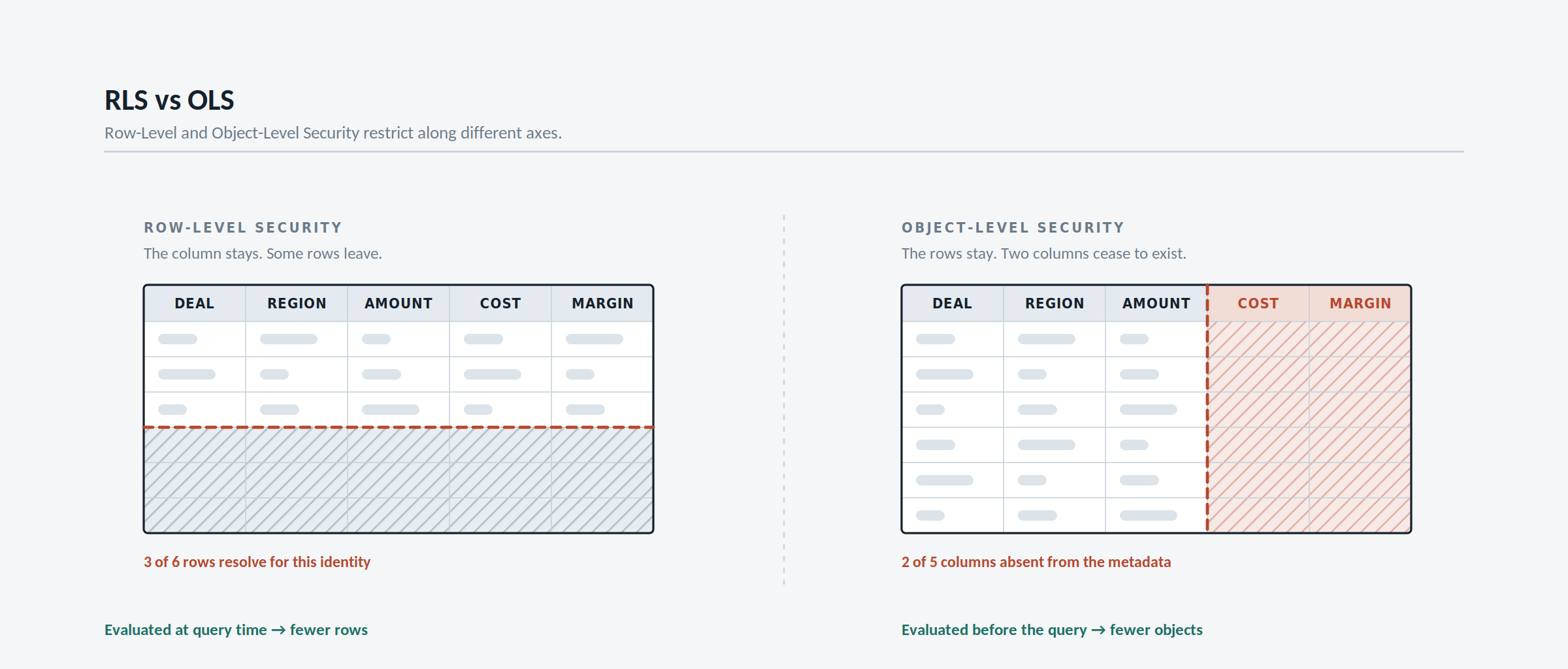
They are not the same request. The first is a horizontal restriction — same shape of report, fewer rows. The second is a vertical restriction — the column itself must cease to exist for that audience.
RLS answers the first. It cannot answer the second, because RLS filters rows and leaves the model's structure fully visible. A user restricted by RLS still sees every table and column name in the field list, still sees them in the data model view, and can still build a visual on Cost — they just get filtered rows back.
OLS answers the second. It removes the object from the metadata entirely, so the user's client tool behaves as though the column was never authored.
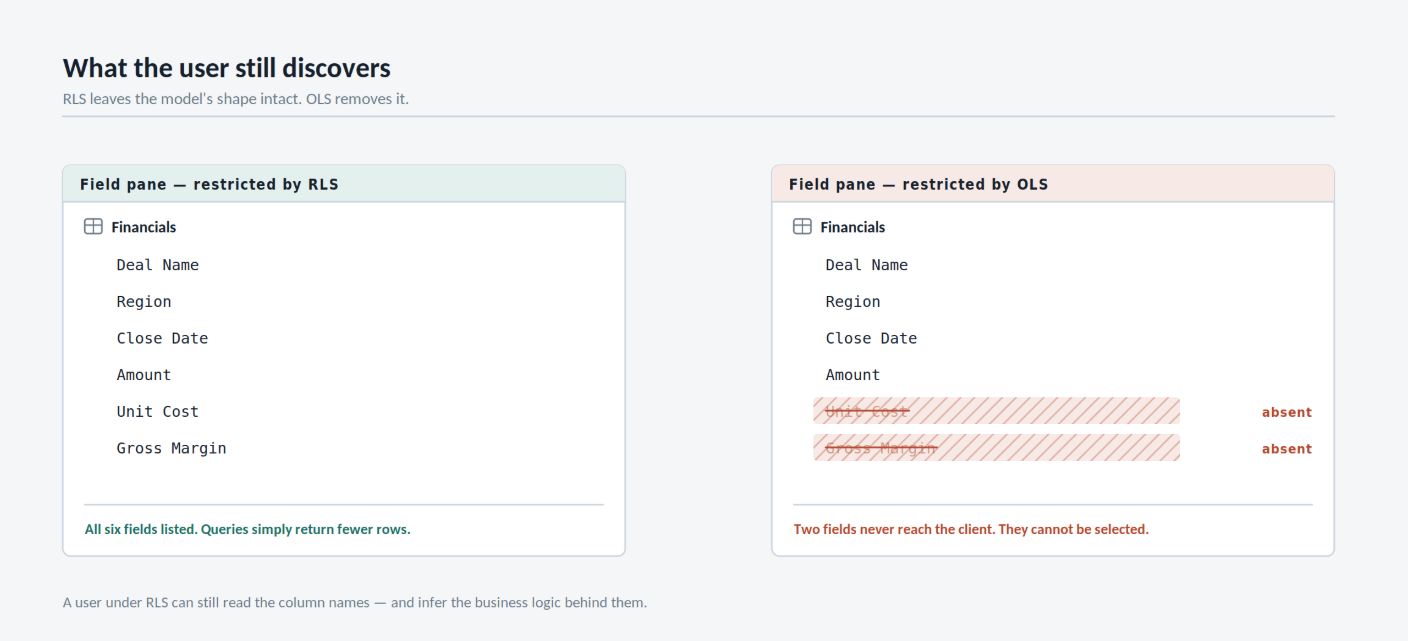
Field pane for the same model, same user — left under RLS only, right with OLS applied. Under RLS the restricted columns are still discoverable.
The Core Insight: Rows Are Data, Objects Are Metadata
This is the whole distinction, and everything else follows from it.
RLS is evaluated at query time. The engine takes your role's DAX predicate, applies it as a filter on the underlying table, propagates that filter across relationships, and then answers the query. The model definition is untouched — only the result set shrinks.
OLS is evaluated at metadata resolution time, before a query is even planned. When a restricted user connects, the engine hands back a model definition with the secured tables and columns stripped out. Any DAX that references a removed object doesn't return blank — it fails to resolve.
That single difference explains almost every quirk in the rest of this post: RLS degrades gracefully, OLS degrades loudly.
Setting Up RLS
RLS lives natively in Power BI Desktop. Modeling → Manage roles, create a role, and write a DAX boolean expression against the table you want to constrain.
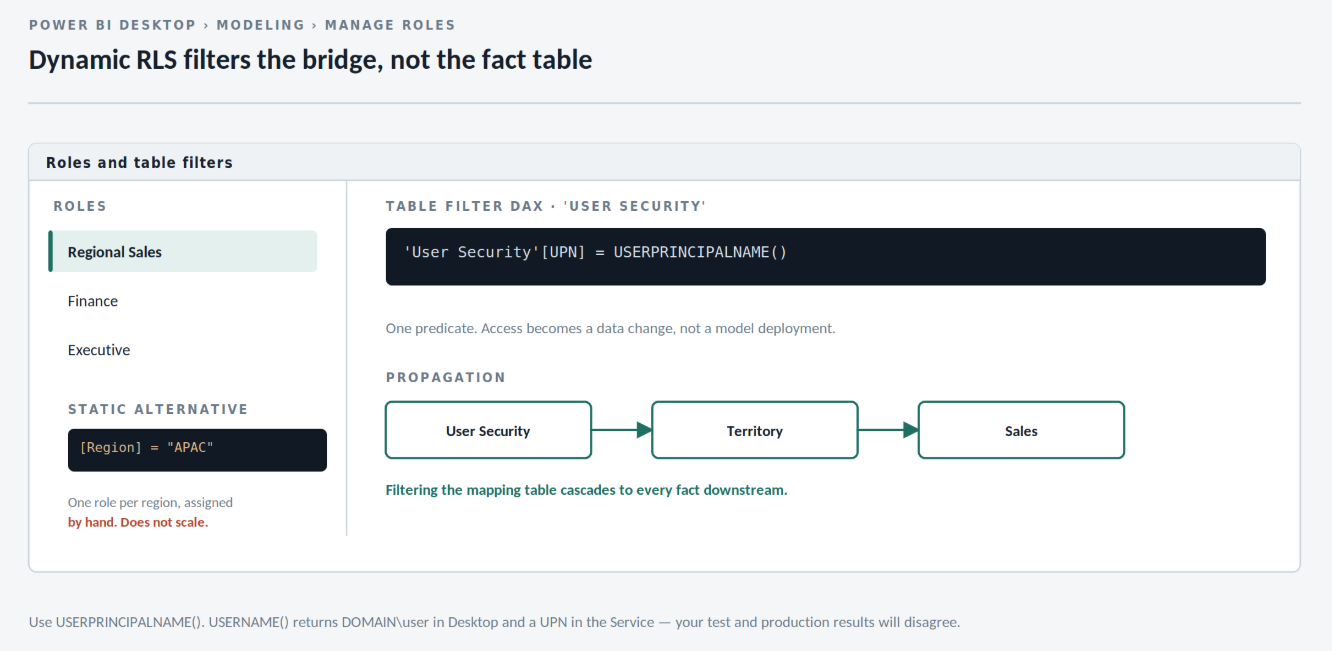
Modeling → Manage roles. The expression must evaluate to TRUE/FALSE per row of the selected table.
The static version is trivial:
-- Table filter on 'Territory'
[Region] = "APAC"
Static roles don't scale — you'd need one role per region and a manual assignment for every user. The pattern worth actually building is dynamic RLS, driven by the identity of the caller:
-- Table filter on 'Territory'
[Region] =
    LOOKUPVALUE(
        'User Security'[Region],
        'User Security'[UPN], USERPRINCIPALNAME()
    )
Better still, filter the bridge table itself and let relationships do the propagation:
-- Table filter on 'User Security'
'User Security'[UPN] = USERPRINCIPALNAME()
With User Security related one-to-many to Territory, filtering the bridge cascades outward to every fact table downstream. One role covers the entire organisation, and access changes become data changes rather than model changes.
Use
USERPRINCIPALNAME(), notUSERNAME(). In the Service they both return the UPN, but in DesktopUSERNAME()returnsDOMAIN\user— which means your test results and your production results silently disagree.
Roles are authored in Desktop but assigned in the Service, on the semantic model's Security page.
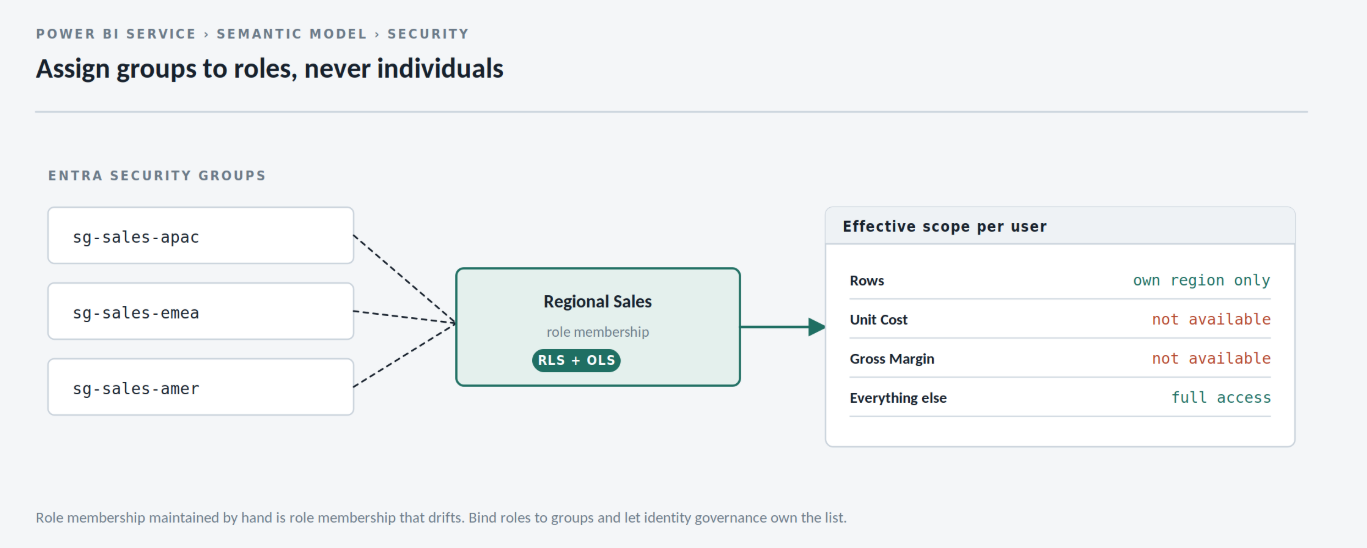
Assign security groups rather than individuals — role membership is not something you want to maintain by hand.
Setting Up OLS
There is still no OLS authoring surface in the Power BI Desktop UI. You define it externally — Tabular Editor over the local Desktop instance, or via the XMLA endpoint against a published model.
In Tabular Editor, select the role, then set Metadata Permission to None on the target table or column.
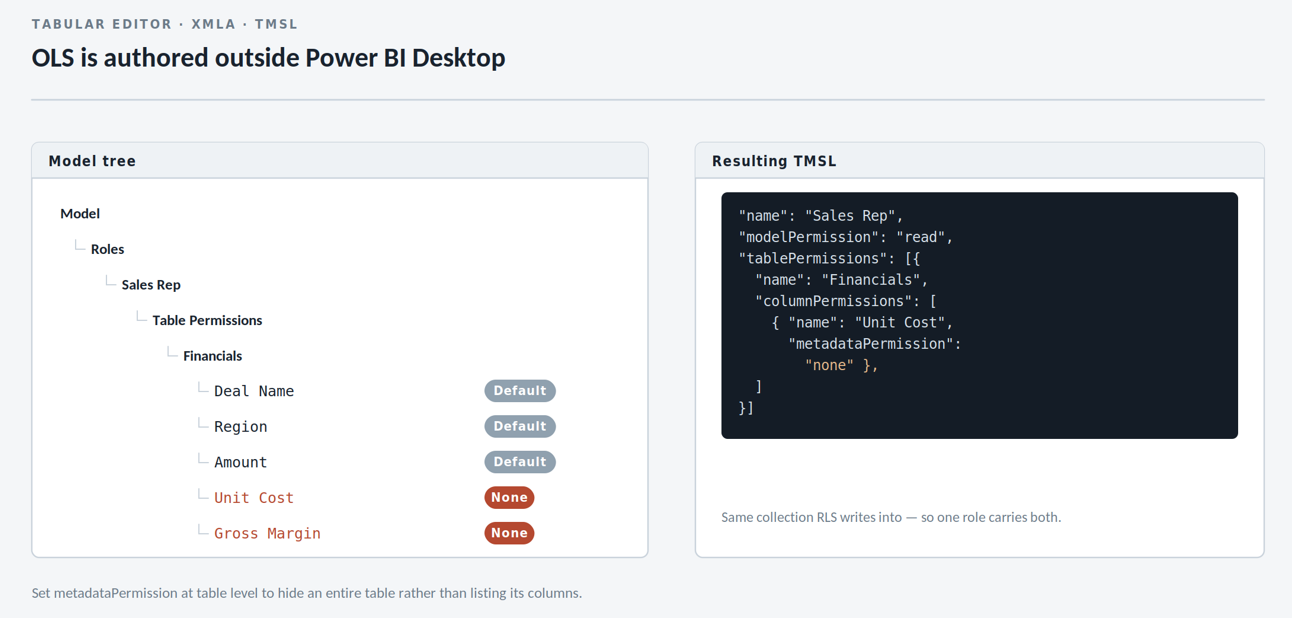
Tabular Editor 2 — Roles → Sales Rep → Object Level Security. Permission is set per table or per column.
The underlying TMSL is straightforward, and worth knowing if you're scripting deployments:
{
  "name": "Sales Rep",
  "modelPermission": "read",
  "tablePermissions": [
    {
      "name": "Financials",
      "columnPermissions": [
        { "name": "Unit Cost",     "metadataPermission": "none" },
        { "name": "Gross Margin",  "metadataPermission": "none" }
      ]
    }
  ]
}
To secure an entire table, set metadataPermission at the table level instead of listing columns.
Note that tablePermissions is the same collection RLS writes into — which is exactly why both securities can live on one role, covered further down.
Challenge 1: RLS and Bidirectional Relationships
The most common RLS bug isn't a wrong filter — it's a filter that doesn't travel.
RLS respects relationship cross-filter direction. A single-direction relationship from Territory to Sales propagates the restriction to Sales, but a second dimension hanging off Sales won't be constrained, and dimension tables sitting on the many side of the security path leak entirely.
The tempting fix is to flip relationships to bidirectional. Don't — bidirectional filtering plus RLS is a well-known source of both ambiguity errors and query plans that fall off a performance cliff, because the engine has to resolve the security filter in both directions on every query.
The safer approach is to keep relationships single-direction and switch direction explicitly, only where the security path needs it:
-- On the relationship, in Manage Relationships:
-- keep Territory → Sales as single (Both = off)

-- Then in the role's DAX, open the path deliberately:
[Region] IN
    CALCULATETABLE(
        VALUES( 'Territory'[Region] ),
        CROSSFILTER( 'Territory'[TerritoryKey], 'Sales'[TerritoryKey], BOTH )
    )
If you genuinely need a bidirectional relationship in the model for reporting reasons, tick Apply security filter in both directions on that relationship rather than relying on the default — the flag exists precisely so security propagation and report filtering can be reasoned about separately.
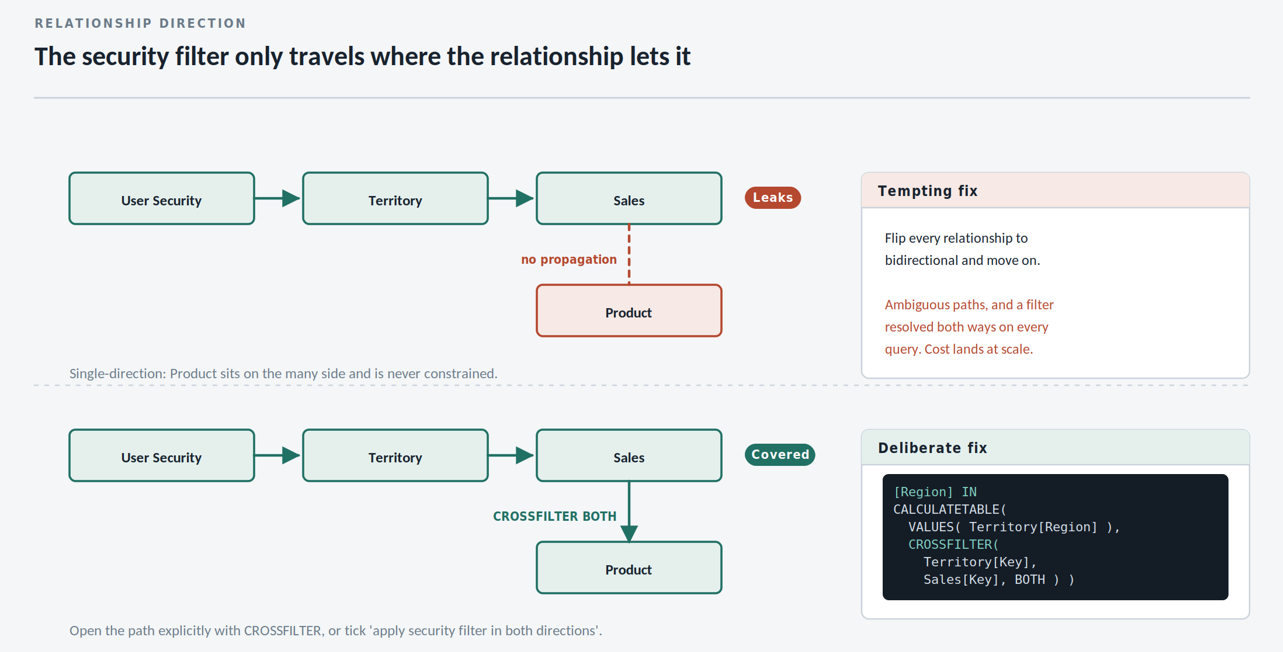
The security checkbox is disabled until cross-filter direction is set to Both — it's opt-in, not automatic.
Challenge 2: OLS Doesn't Hide Visuals, It Breaks Them
This one surprises people the first time it happens in front of an audience.
Apply OLS to Gross Margin, then open a report page containing a card built on Gross Margin, as a restricted user. The card does not disappear and does not go blank. It renders an error, because the visual's query references an object that no longer resolves for that identity.
The blast radius is wider than the column itself:
- Any measure referencing a secured column fails, even if the measure output is harmless.
Margin %breaks as surely asGross Margindoes. - Any calculated column or table referencing a secured object becomes unresolvable for that role.
- Relationships through a secured table cut the propagation path, which can quietly change numbers elsewhere rather than raising an error.
The practical consequence: OLS is a report design constraint, not just a model setting. If a secured column appears anywhere on a shared page, you need either separate report pages per audience or separate reports over the same model.
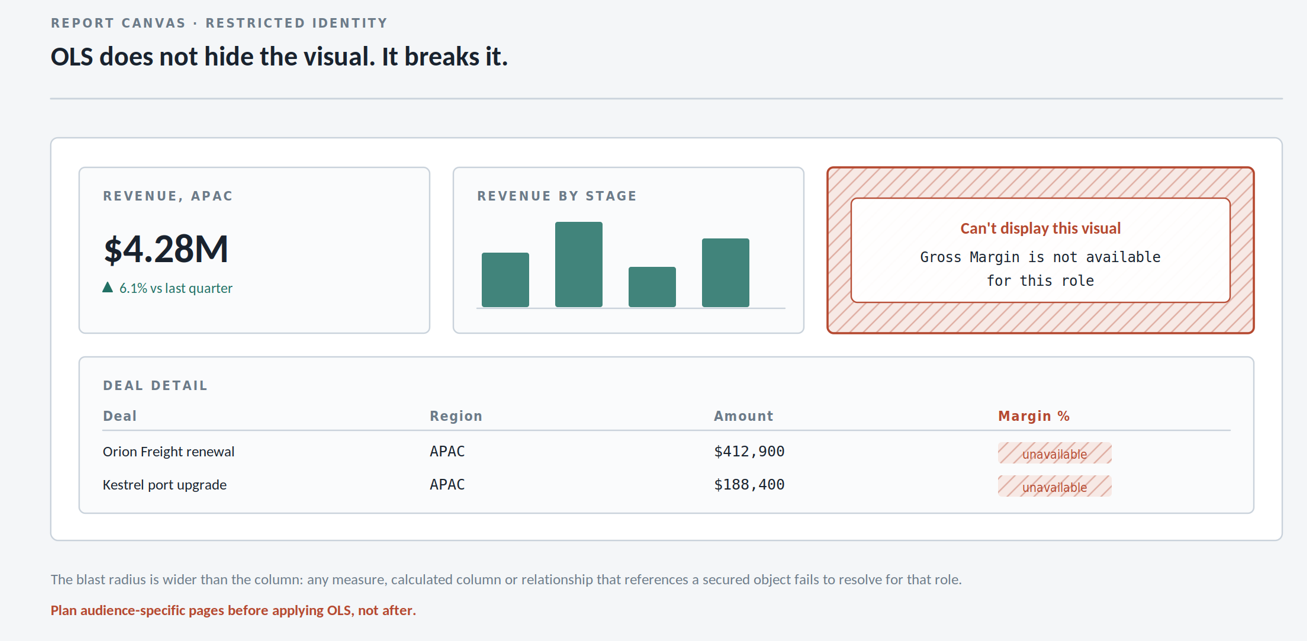
What a restricted user actually sees — one broken visual among working ones, not a gracefully hidden card.
A defensive pattern that helps: expose an unsecured, pre-aggregated measure that the restricted audience is allowed to use, computed inside a secured measure only where the underlying column stays hidden. It doesn't remove the design constraint, but it keeps shared pages viable.
Challenge 3: Testing What the User Will Actually See
Desktop's View as dialog is the fastest test loop, and it covers both securities — including OLS roles authored through Tabular Editor against the live Desktop instance.
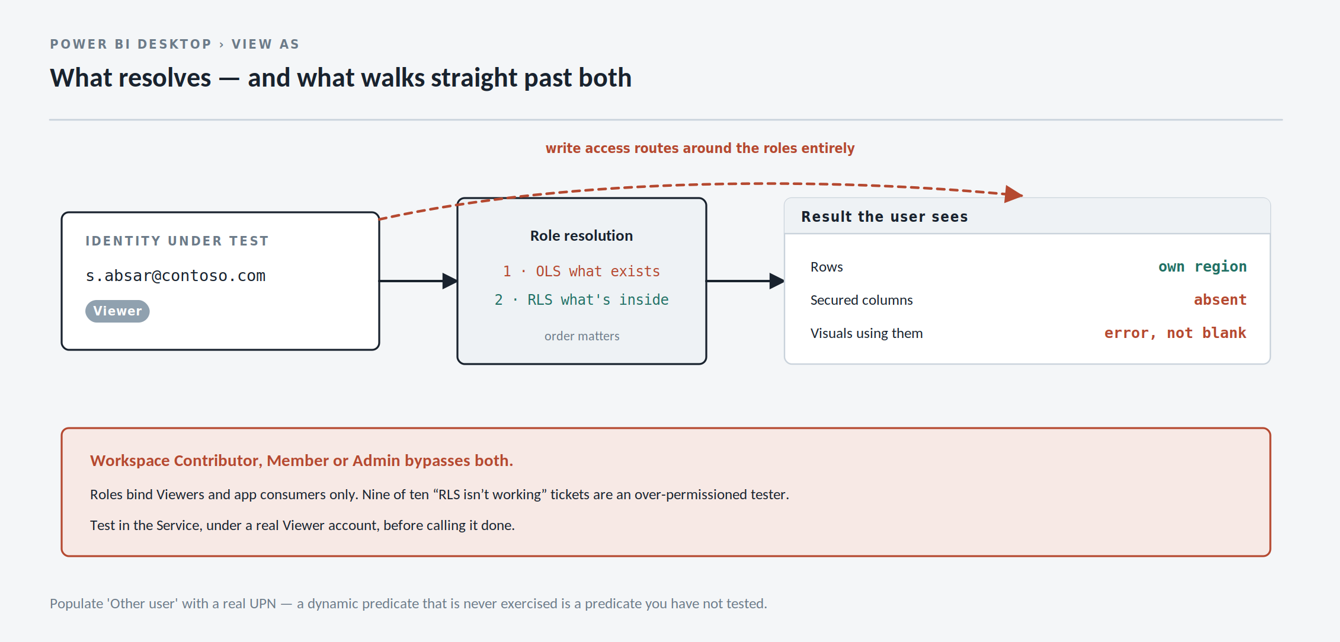
View as → tick the role, and populate Other user with a real UPN to exercise dynamic RLS predicates.
Three things it won't catch, though:
- Workspace permissions override RLS. Anyone with Admin, Member or Contributor access on the workspace bypasses roles entirely. RLS only binds Viewers and app consumers. A "RLS isn't working" ticket is, nine times out of ten, an over-permissioned tester.
- Empty results and blocked results look identical. A user seeing no rows might be correctly filtered, or might be missing from your bridge table entirely. Add a diagnostic measure —
SELECTEDVALUEover the security table, or a bareUSERPRINCIPALNAME()card — to a hidden validation page. - Downstream artefacts don't inherit anything. Export to Excel, paginated reports over the same model, and Analyze in Excel all honour RLS through the same identity. Composite models chaining onto the model, however, need their own review — the security context of the chained model is the thing to verify, not the source.
Test in the Service under a genuine restricted account before you call it done.
Combining Both on One Role
RLS and OLS aren't alternatives; production models usually want both. A single role can carry row filters and metadata permissions simultaneously — the role definition simply holds both.
{
  "name": "Regional Sales",
  "modelPermission": "read",
  "tablePermissions": [
    {
      "name": "User Security",
      "filterExpression": "'User Security'[UPN] = USERPRINCIPALNAME()"
    },
    {
      "name": "Financials",
      "columnPermissions": [
        { "name": "Unit Cost", "metadataPermission": "none" }
      ]
    }
  ]
}
Order of evaluation matters for reasoning about behaviour: OLS resolves first and determines what exists, then RLS filters what's in it. A column removed by OLS cannot be referenced by an RLS predicate on the same role — the predicate won't resolve, and the role fails rather than silently allowing everything.
When a user belongs to multiple roles, RLS is additive — filters union, so the user sees the combined set of rows. OLS is the opposite: it is restrictive, and an object hidden by any one of the user's roles stays hidden. Two roles that individually look correct can combine into something you didn't intend in both directions.
The Same Problem One Layer Down: Fabric Warehouse
If your semantic model sits on a Fabric Warehouse or Lakehouse SQL endpoint, the equivalent controls exist in T-SQL — and applying them there means every consumer inherits the restriction, not just Power BI.
Row-level security via a predicate function and security policy:
CREATE FUNCTION dbo.fn_RegionPredicate(@Region AS VARCHAR(50))
RETURNS TABLE
WITH SCHEMABINDING
AS
RETURN
    SELECT 1 AS Result
    FROM dbo.UserRegionMap m
    WHERE m.UPN = USER_NAME()
      AND m.Region = @Region;
GO

CREATE SECURITY POLICY dbo.RegionFilter
ADD FILTER PREDICATE dbo.fn_RegionPredicate(Region)
    ON dbo.FactSales
WITH (STATE = ON);
Column-level security is a plain DENY:
DENY SELECT ON dbo.FactSales(UnitCost, GrossMargin) TO SalesReps;The trade-off is where enforcement lives. Warehouse-level security covers every tool that touches the data, but an Import-mode semantic model refreshes under the identity of its connection — so it caches whatever that identity is allowed to see, and the row filters don't reach the report consumer. Security enforced in the warehouse only flows through to end users on DirectQuery or Direct Lake with single sign-on.
Comparison Summary
| Row-Level Security | Object-Level Security | |
|---|---|---|
| Restricts | Rows within a table | Tables and columns themselves |
| Evaluated at | Query time | Metadata resolution, before query |
| Authored in | Power BI Desktop UI | Tabular Editor / XMLA / TMSL |
| Field list visibility | Object still visible | Object absent entirely |
| Blocked access looks like | Fewer rows, or blank | Visual error / unresolvable reference |
| Multiple roles | Additive — filters union | Restrictive — hidden stays hidden |
| Dynamic by user | Yes, via USERPRINCIPALNAME() | No — role membership only |
| Testable in Desktop | Yes, View as | Yes, if defined against the local model |
| Bypassed by | Workspace Contributor and above | Workspace Contributor and above |
Key Takeaways
- Match the tool to the axis of restriction. Horizontal (which rows) is RLS. Vertical (which fields) is OLS. Using RLS to approximate OLS leaves the column names, and therefore the business logic they imply, fully visible.
- Filter the bridge table, not the fact table. One dynamic predicate on a user-to-dimension mapping table propagates everywhere and turns access management into a data operation instead of a model deployment.
- Bidirectional relationships and RLS are a bad default. Keep relationships single-direction and open the path deliberately with
CROSSFILTER, or tick the security-in-both-directions flag knowingly — don't inherit the behaviour by accident. - OLS is a report design constraint. Because secured objects break visuals rather than hiding them, an OLS decision commits you to either audience-specific pages or separate reports. Decide that before you apply it, not after.
- Workspace permissions trump both. Neither security applies to anyone with write access on the workspace. Test with a real Viewer account, in the Service, or you're testing nothing.
- Push it down a layer when you can. Warehouse-level RLS and column DENY protect every consumer of the data — but only reach report users on DirectQuery or Direct Lake with SSO. Import mode caches the refresh identity's view.